More AIBeta
One place for documents, code and supported cloud work. Use your own key on desktop, then continue available work in the web app — including on your phone.
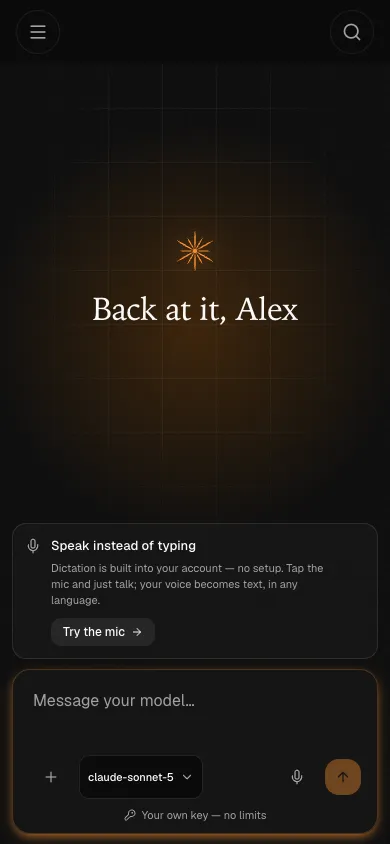
- Your key, your budget
- Cowork for files, Code for repositories
- Continue when you choose
A new Home for Cowork — with Code alongside
In the new interface, every new conversation starts in Cowork. Earlier Chat threads stay readable, while repository work keeps its dedicated Code workspace.
What changed
Since version 0.1.50, questions, files and projects share one Cowork Home. Every new conversation can work with documents and tools; conversations from the earlier Chat mode remain readable.
- One Home for every new conversation
- Earlier Chat history remains readable
- Available in desktop version 0.1.50 and later
Cowork
The new default for conversations and file work: start with a question, add a folder when needed, review visible edits and build real Word, Excel and PowerPoint files.
- Reads and edits the documents in a folder
- Changes arrive as visible diffs you can review
- Writes real Word, Excel and PowerPoint files
Code
A coding agent on your repository: it plans, edits across files, runs your tests and shows the changes. Its access mode controls which actions ask first.
- Plans first, then edits across many files
- Runs your tests and reads the output
- Access mode decides which commands ask first
Three ordinary working days
The same app, three different jobs. Pick the one that looks like yours.
You ship code
Open a repository in Code, describe a small change and let the agent propose a plan, edit files and run checks within the selected permissions. Review the diff and tests before keeping the changes. Compare total usage, retries and human corrections to find a model that fits your work.
You work in documents
Give Cowork a working copy of your notes or a sample spreadsheet. Ask for a DOCX report or XLSX file, then check the source references, formulas and totals. Choose sync, cloud and Privacy settings for the material before starting; the guide includes a synthetic workspace to practice on.
You want work to continue after you step away
Schedule a morning brief or weekly competitor scan as a server routine. In supported cloud runs, the state continues without the desktop app open and stays attached to a conversation you can revisit from a signed-in device.
Work on desktop. Continue in the web app.
Use the desktop app for local files and repositories. Sign in to view synced work and use supported cloud features in the web app, including on your phone. The Chrome extension pairs with a running desktop app.
Desktop app
Cowork and Code run on your machine. The desktop app is free and local work does not require an account; sign-in adds cloud and sync.
Chrome extension — Beta
Pair the beta extension with the running desktop app to let an agent read and control the current tab, within the browser permissions you grant.
Web app
The web app is live at app.more-ai.net: sign in by email to view synced work, follow server routines and continue supported cloud sessions.
Web on your phone — Available now
Open the web app in your phone browser to view synced work and use cloud features available to your account. Native Android and iOS apps have no public release yet; Android is in private development testing and iOS remains in development.
Optional continuity beyond your laptop — Beta
Desktop work is local by default. In the cloud beta, server-backed routines and supported sessions can continue on our machines, while signed-in devices keep the relevant state in sync.
Research and reports on a schedule
Schedule an industry digest, a public-page check or a report from selected files. Cloud tasks continue after you close the app, and each run keeps its result in a conversation you can open on another device.
Cloud Code workspace — beta
Cloud Code provides a separate environment for repository work, commands and tests. Access depends on the beta rollout and connected services; check availability in your account. Remote work on your own computer is separate and needs that computer online.
One workspace on every device
Supported conversations, workspace state and results stay in step across signed-in devices. Start on desktop, then check the same synced work in a browser or on your phone.
Teams — In development
Shared workspaces, shared connectors and one budget across the team with a limit per member — so you can see where the spend goes without taking control away from anyone.
The cloud beta is free for now
The desktop app is free. Cloud features enabled for your account are also free during beta, with no card required; some new features are being opened gradually. BYOK model usage is billed separately by your provider. A limited starter pool may be granted to your account. We will give advance notice before paid cloud plans begin.
The subscription pays for the cloud — the machines your agents run on and the sync that keeps results in reach. It does not include or sell tokens: BYOK usage stays at your provider’s price. Any free pooled allowance is a separate, limited account grant.
The account already works — sign in with a code sent to your email, no password.
Everything you need, calmly in one place
A warm, focused interface for Cowork, files, Code, scheduled tasks and search — built to stay out of your way during long sessions.
Ask without leaving what you’re doing
Double-tap Option (or press ⌘⇧Space) and a quick box appears on top of whatever app you’re in. Ask a question, attach a screenshot, get the answer right there — then carry on, or continue the thread in the full app.
Set it once, let it run
Schedule the assistant to work on its own — a morning brief, a weekly check, a recurring report. Each run is saved as a conversation you can open whenever you like.
Background tasks
Long Cowork and Code runs can keep working in the desktop app while you do something else. Watch progress, open the transcript or stop a run from one place.
Find anything, instantly
One shortcut searches across Cowork projects, earlier chats and Code sessions — by title or by what’s inside — so past work is easy to find again.
A browser beside your conversation
Let the agent read websites, follow links, fill forms and check local app previews. Pause to take over. Import supported bookmarks, history, cookies and saved logins from your current browser or an export; compatibility depends on the source and operating system.
Live web search & research
Let the assistant look things up on the web and gather sources — pulling back image galleries, maps and more. Keyless search engines are built in, or connect your own premium one.
Talk instead of type
Dictation turns speech into text and can refine a transcript with AI. Speech recognition and text refinement may use different local or remote services. Check both selections and Privacy settings before dictating sensitive material.
A memory that sticks
The assistant remembers durable facts and preferences across conversations, kept as a plain file on your machine that you can read, edit or clear whenever you like.
Library and Google Drive
Find files, ask about a selected document and return to earlier versions. More AI Drive requires a signed-in account with storage access; its beta rollout is gradual. Connect Google Drive separately to browse its files and folders.
A full toolkit, under your control
It can read and write files, run commands, search the web, schedule routines and connect to your other apps — and you can turn any capability off in a single click.
Make it fit the tools you already use
Add a connector and its actions become available to the assistant in Cowork and Code — update a Notion page, read a Linear issue, look up a Stripe customer or open a pull request. Check the list for your own stack.
Adobe Workfront, Affinity, AgentMail, Ahrefs, AirOps, Airtable, alphaXiv, Amplitude, Apify, Apollo.io, Asana, Astro Docs, Atlassian, Attio, Base44, BioRender, Blockscout, Box, Brevo, Brex, Calendly, Campfire, Canva, Circleback, Clarify, Clay, Clerk, ClickUp, Close, Cloudflare Docs, Cloudflare Workers, Cloudinary, CoinDesk, Common Room, Consensus, Contentsquare, Context7, Coralogix, CourtListener, Craft, Crypto.com Market Data, Customer.io, Databricks, Datadog, DataHub, Day AI, dbt, DeepWiki, Descript, DevRev, Digits, Dovetail, Dropbox, Dynatrace, Egnyte, Elicit, Enterpret, Eraser, Exa, Excalidraw+, Fathom, Fellow, Felt, Fever, Figma, Fireflies, Gamma, GitHub, Glean, Globalping, GoCardless, Grafana Cloud, Grain, Granola, Guru, Gusto, Harmonic, Hex, Honeycomb, Hugging Face, HyperFrames, IFTTT, incident.io, Instacart, Intercom, Jam, Jotform, Kiwi.com, Klaviyo, Krisp, Linear, Lorikeet, Lucid, LunarCrush, Lusha, Magic Patterns, Mailchimp Transactional, MailerLite, Make, Mem, Mercury, Mermaid Chart, Metabase, Metaview, Microsoft Learn, Mintlify, Miro, Mixpanel, monday.com, Monte Carlo, MotherDuck, n8n, Neon, Netlify, Nimble, Notion, O’Reilly, Omni Analytics, Open Targets, OpenRouter, Otter.ai, Outreach, PagerDuty, PandaDoc, Parallel Search, PayPal, Peec AI, Pendo, Plaid, PlanetScale, PostHog, Postman, Prisma Postgres, Profound, Pylon, Qonto, QuickNode, Ramp, Razorpay, Read AI, Replit, Resend, Rillet, Salesloft, Sanity, Scite, Semgrep, Semrush, Sentry, Shopify Storefront, Sigma, Similarweb, Smartsheet, Snowflake, Socket, Sourcegraph, Spinach AI, Square, Stack Overflow, Strava, Stripe, Stytch, Sumble, Supabase, Superhuman Mail, Supermetrics, SurveyMonkey, SwaggerHub, Tableau, Tavily, ThoughtSpot, Todoist, TomTom Maps, Twilio Docs, Unthread, Unwrap, Vercel, Webflow, Whimsical, Windsor.ai, Wix, Wolfram, WordPress.com, Workable, Wrike, Zapier, ZoomInfo
Any remote MCP server
Paste a URL and its tools show up alongside the built-in ones in Cowork and Code.
Local plugins
Install from a .mcpb file — the same format Claude Desktop extensions use — and it runs on your machine, offline included.
Permission per connector
Switch any connector on, off or down to read-only, and approve what the agent does with it.
The catalog is a shortcut, not a boundary: anything that speaks MCP can be added, and each connector keeps its own permissions.
Run Claude Code, Codex or OpenCode inside More AI (soon)
Code is getting a choice of agent. Keep More AI’s own, or hand the coding to one you already know — the session, permissions, browser, connectors and sync stay the same. It is in testing now and arrives in an upcoming release.
More AI (built in)
The agent Code runs today. Works with every provider you add, local models included.
Claude Code (soon)
Anthropic’s coding agent, with its own planning and context handling. Runs on an Anthropic key or a compatible API.
Codex (soon)
OpenAI’s coding agent, connected through the official Codex app server. Runs on an OpenAI or OpenRouter key.
OpenCode (soon)
The open-source coding agent. Of the three it supports the most providers, local models in Ollama and LM Studio included.
Whichever agent writes the code
- Nothing to install by hand — More AI installs each agent inside the app — nothing global, nothing in your repository. Update in one click, or pin a version and roll back.
- One set of permissions — Your access mode, from Plan and Read-only to Full access, applies to every agent, and More AI checks each command before it runs.
- The same toolkit — The built-in browser, connectors, skills and memory work with every agent.
- Switch mid-session — Change the agent inside a session; the new one picks up the same conversation.
- Your key or its own sign-in — Use a compatible API key you have already added to More AI, or the agent’s own sign-in.
- Bring your setup along — Import skills, commands, instruction files and MCP connectors from Claude Code, Codex, OpenCode, Cursor and Gemini. Imported connectors stay off until you enable them, and the source apps are left untouched.
Claude Code, Codex and OpenCode are names of Anthropic, PBC, OpenAI, L.L.C. and Anomaly Innovations, Inc. respectively, used here only to identify compatible third-party agents. More AI is independent and is not affiliated with, endorsed or sponsored by these companies.
Your key, your models, your budget
For local desktop BYOK tasks, More AI connects to the provider using your key. You pay the provider for model usage, without a More AI token markup. Choose a model for the task and review its usage; cloud runs and synchronization have separate settings.
OpenAI, Anthropic, Google, Mistral, Groq, DeepSeek, OpenRouter and more — or a model running fully locally via Ollama.
More AI vs. cloud chat apps
Compare the billing model, supported workflows and data settings. Individual products differ; the detailed comparisons link to their current documentation.
| More AI | Cloud apps | |
|---|---|---|
| Where your work lives | Local copy; sync and cloud controls are configurable | Provider storage and retention vary by product |
| What you pay for | The app is free; tokens at provider cost | Subscription, usage billing or a combination |
| Who sets the limits | Your model choice and provider budget controls | Their plan does |
| Where it runs | macOS · Windows · Linux · web, including phones | Varies |
| Works offline | Local tasks without online tools or services | No |
| Choice of models | Supported provider APIs and local models | One or several providers, depending on the product |
The things people ask before downloading
Short answers to what usually decides it. The docs go deeper.
Is More AI free?
The desktop app is free, and local Cowork and Code work does not require an account. The paid layer is the optional cloud: server execution and sync. Currently enabled cloud features are free during the beta. A subscription does not include tokens: BYOK usage runs at your provider’s price; signed-in accounts may separately receive a limited free pooled allowance.
Do I need an account?
Not for local desktop work with your own key or model. An account is needed for cloud features — sync, web or mobile access and server runs — and for any pooled starter models granted to your account.
Where is my data stored?
Desktop work has a local copy. After sign-in, enabled sync categories upload supported data; cloud execution is a separate choice. AI observability and replay have separate data flows and Privacy controls, including for BYOK. See the privacy policy before working with sensitive files.
Which AI models can I use?
Any provider you hold a key for — OpenAI, Anthropic, Google, Mistral, Groq, DeepSeek, OpenRouter and other compatible APIs — or a model running fully locally through Ollama. You choose the model per conversation, and you can change it mid-thread.
Can I use Claude Code, Codex or OpenCode in More AI?
Soon — support is in testing now. Code will let you choose the agent for each session: More AI’s built-in one, Claude Code, Codex or OpenCode, running on a compatible API key from your settings or on the agent’s own sign-in. Permissions, the built-in browser, connectors and sync stay the same whichever you pick. Until that release, Code runs More AI’s own agent.
What does it actually cost to run?
With BYOK, model usage is billed by your provider without a More AI token markup. Total cost depends on the model, context length, tool results and retries. Check usage after a small task and include failed attempts and human corrections when comparing options. Cloud subscriptions are separate; available cloud features are free during beta.
Does it work offline?
A local-model workflow can work offline through Ollama as long as it does not invoke cloud execution, sync, web search, remote connectors, update checks or another online service.
Which platforms are supported?
Native desktop builds support macOS, Windows and Linux. The Chrome extension is a beta preview installed from a local build and paired with the running desktop app. The live web app works in modern browsers, including on a phone. Native Android is in private development testing; iOS is in development and simulator testing, with no public store release yet.
Is the download safe?
Published installers are submitted to VirusTotal. When the current report is available, the security page shows which engines scanned each file, its hash and the report link; otherwise it says that results are unavailable.
Start on desktop or in the web app
Work with local files and repositories on your computer. On your phone, open the web app to see synced work and use supported cloud features available to your account.
Choose where to begin
Install More AI on macOS, Windows or Linux for local work without a required account. On a phone, open the web app and sign in by email.
Set up your work
On desktop, add a provider key or local model for Cowork and Code. For cloud work, sign in and check which features are available to your account; cloud keys are configured separately.
Pick up the result
Use desktop Cowork for local files or Code for a repository. In the web app, view synced work, follow routines and continue supported cloud sessions. Check results, permissions and usage after each task.